Connect two LANs through an IPIP tunnel.
Network
Scroll sideways to exploreOpen full diagram
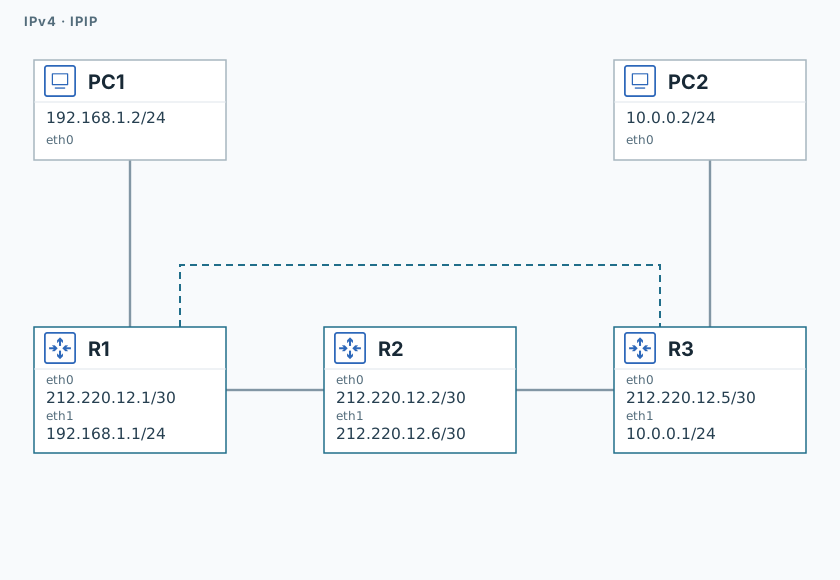
1. Test initial connectivity
R1
ping -n -c 3 -W 1 212.220.12.5PC1
ping -n -c 3 -W 1 10.0.0.2R3 replies, but PC2 is not yet reachable.
2. Create the tunnel
R1
ip tunnel add tun0 mode ipip local 212.220.12.1 remote 212.220.12.5
ip address add 10.255.0.1/30 dev tun0
ip link set dev tun0 up
ip route replace 10.0.0.0/24 via 10.255.0.2 dev tun0R3
ip tunnel add tun0 mode ipip local 212.220.12.5 remote 212.220.12.1
ip address add 10.255.0.2/30 dev tun0
ip link set dev tun0 up
ip route replace 192.168.1.0/24 via 10.255.0.1 dev tun03. Verify encapsulation
R2
timeout 120 tcpdump -U --immediate-mode -i eth0 -w /tmp/lab-ipip.pcap "ip proto 4" &
capture_pid=$!
sleep 1PC1
ping -n -c 3 -W 1 10.0.0.2PC2
ping -n -c 3 -W 1 192.168.1.2R2
sleep 2
kill -INT "$capture_pid"
wait "$capture_pid" || true
tcpdump -nn -e -r /tmp/lab-ipip.pcap "ip proto 4"Both pings should succeed. Find the outer IPv4 header with 212.220.12.1/.5 and the inner header with the PC addresses.
Validation
Click "Check". Once all steps pass, click "End".