VXLAN: two isolated networks
Build two isolated VXLAN networks.
Network
Scroll sideways to exploreOpen full diagram
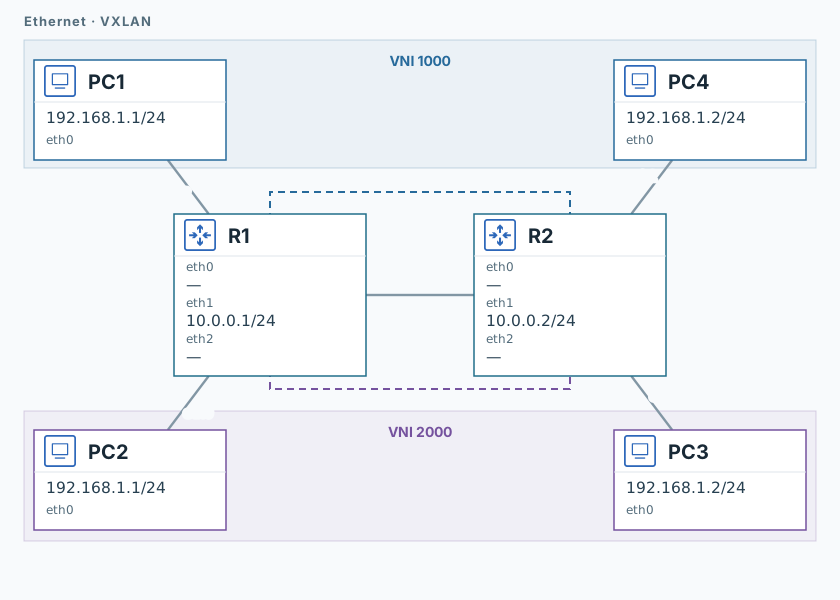
1. Test the underlying network
R1
ping -n -c 3 -W 1 10.0.0.2PC1
ping -n -c 3 -W 1 192.168.1.2R2 replies, but the remote PC is not yet reachable.
2. Create two networks
R1
ip link add br1000 type bridge
ip link add br2000 type bridge
ip link add vx1000 type vxlan id 1000 local 10.0.0.1 remote 10.0.0.2 dev eth1 dstport 4789
ip link add vx2000 type vxlan id 2000 local 10.0.0.1 remote 10.0.0.2 dev eth1 dstport 4789
ip link set dev eth2 master br1000
ip link set dev vx1000 master br1000
ip link set dev eth0 master br2000
ip link set dev vx2000 master br2000
ip link set dev br1000 up
ip link set dev br2000 up
ip link set dev vx1000 up
ip link set dev vx2000 upOn R2, run the same block, changing the addresses in both vxlan commands to local 10.0.0.2 remote 10.0.0.1.
3. Capture traffic
R1
timeout 120 tcpdump -U --immediate-mode -i eth1 -w /tmp/lab-vxlan.pcap "udp port 4789" &
capture_pid=$!
sleep 1PC3 and PC4
timeout 120 tcpdump -U --immediate-mode -i eth0 -w /tmp/lab-vxlan.pcap "arp or icmp" &
capture_pid=$!
sleep 1PC1, then PC2
ping -n -c 3 -W 1 192.168.1.24. Verify separation
R1, PC3, and PC4
sleep 2
kill -INT "$capture_pid"
wait "$capture_pid" || true
tcpdump -nn -e -r /tmp/lab-vxlan.pcapBoth pings should succeed. On R1, find UDP port 4789 and VNI 1000/2000.
PC4 receives requests from MAC ...:01 (PC1); PC3 receives them from ...:02 (PC2). Neither should receive requests from the other sender.
Validation
Click "Check". Once all steps pass, click "End".