Disconnect a link and test STP failover.
Network
Scroll sideways to exploreOpen full diagram
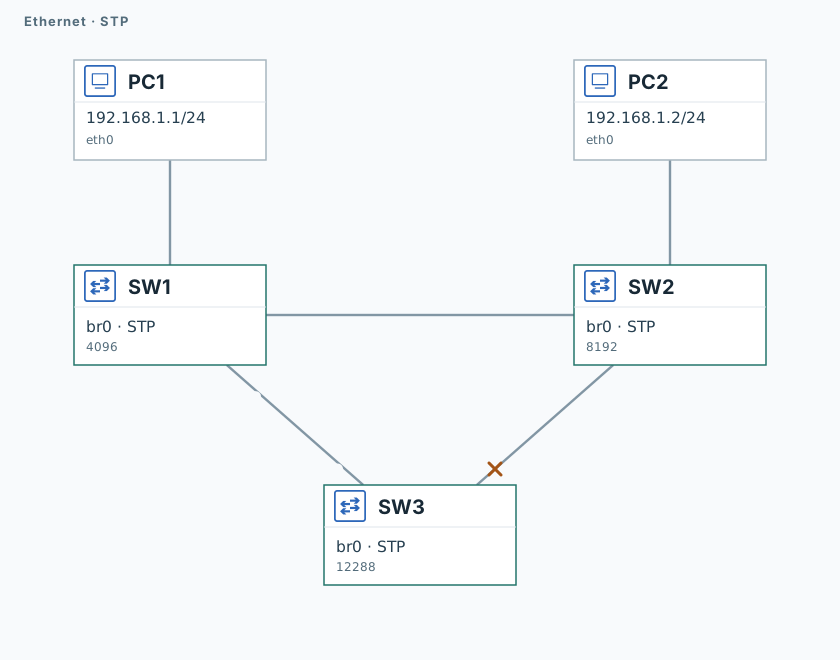
1. Find the blocked port
SW3
brctl showstp br0Wait for eth1 to enter blocking.
brctl showstp br0 > /tmp/lab-stp-before.txtPC1
ping -n -c 3 -W 1 192.168.1.22. Disconnect the primary path
SW1
ip link set dev eth1 down
sleep 50SW3
brctl showstp br0 > /tmp/lab-stp-after.txt
cat /tmp/lab-stp-after.txtSW3
timeout 120 tcpdump -U --immediate-mode -i eth1 -w /tmp/lab-stp.pcap "icmp" &
capture_pid=$!
sleep 1PC1
ping -n -c 3 -W 1 192.168.1.2SW3
sleep 2
kill -INT "$capture_pid"
wait "$capture_pid" || true
tcpdump -nn -e -r /tmp/lab-stp.pcapThe ping should succeed via SW3. Its eth1 is now forwarding, and the capture contains ICMP.
3. Restore the link
SW1
ip link set dev eth1 up
sleep 50SW3
brctl showstp br0PC1
ping -n -c 3 -W 1 192.168.1.2The ping succeeds again, and SW3’s backup eth1 returns to blocking.
Validation
Click "Check". Once all steps pass, click "End".