Locate TTL expiry in a routing loop.
Network
Scroll sideways to exploreOpen full diagram
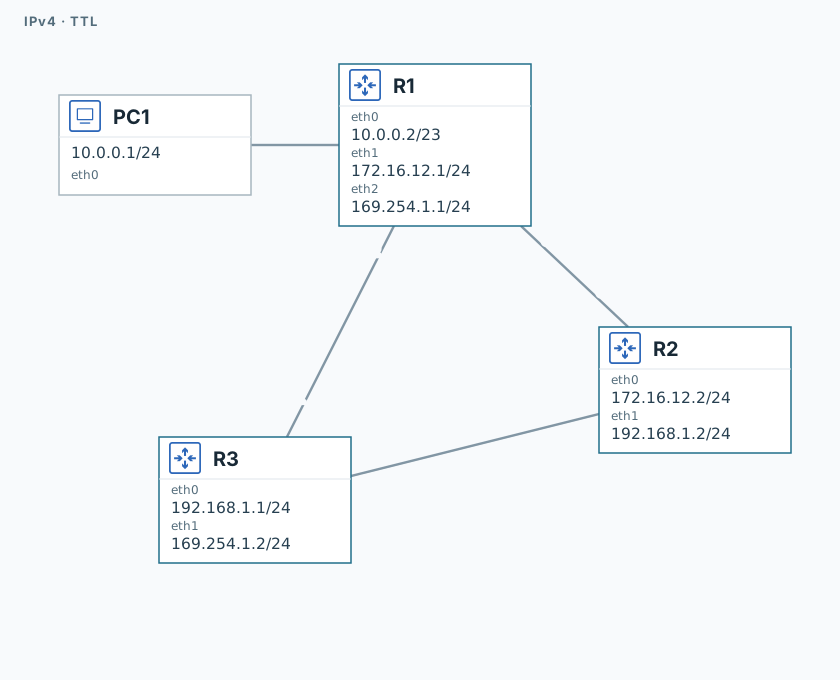
1. Find the loop
R1, R2, and R3
ip -j route showTrace the route to 12.34.45.67. Keep the loop for this experiment.
2. Compare TTL values
PC1
ping -n -c 3 -W 1 10.0.0.2
ping -n -c 3 -W 1 -t 2 12.34.45.67
ping -n -c 3 -W 1 -t 3 12.34.45.67The gateway replies. Compare error senders for different TTL values.
PC1
timeout 120 tcpdump -U --immediate-mode -i eth0 -w /tmp/lab-ttl.pcap "icmp" &
capture_pid=$!
sleep 1PC1
ping -n -c 3 -W 1 -t 5 12.34.45.67PC1
sleep 2
kill -INT "$capture_pid"
wait "$capture_pid" || true
tcpdump -nn -e -r /tmp/lab-ttl.pcap "icmp[0] == 11 and icmp[1] == 0"Find ICMP 11/0 — TTL exceeded. Identify the router that dropped the packet.
Validation
Click "Check". Once all steps pass, click "End".