Connect two overlapping LANs using NAT.
Network
Scroll sideways to exploreOpen full diagram
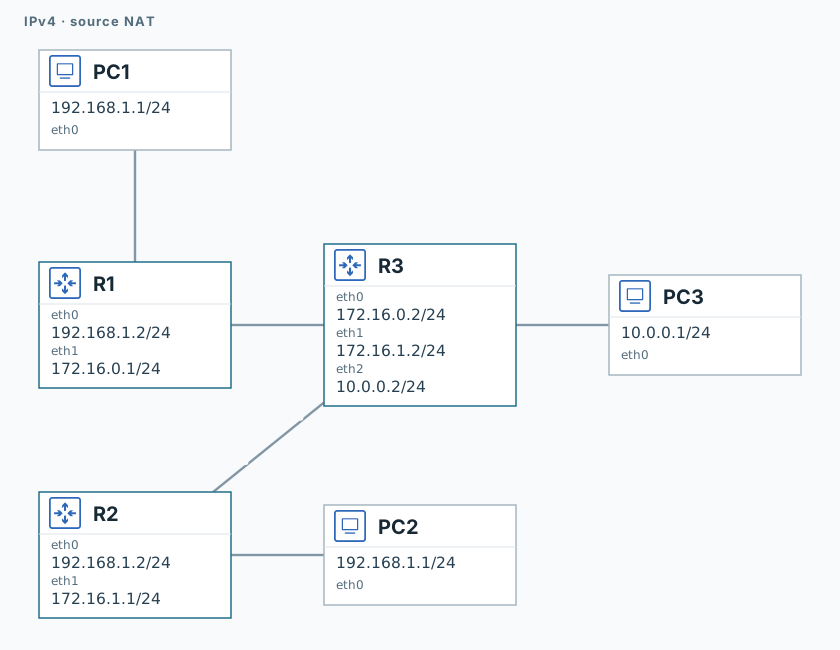
1. Test connectivity without NAT
PC1 and PC2
ping -n -c 3 -W 1 192.168.1.2
ping -n -c 3 -W 1 10.0.0.1The gateways reply; remote PC3 does not.
2. Enable NAT
R1 and R2
iptables -t nat -A POSTROUTING -s 192.168.1.0/24 -o eth1 -j MASQUERADER1 and R2
timeout 120 tcpdump -U --immediate-mode -i eth1 -w /tmp/lab-nat.pcap "icmp" &
capture_pid=$!
sleep 13. Compare source addresses
PC1 and PC2
ping -n -c 3 -W 1 10.0.0.1R1 and R2
sleep 2
kill -INT "$capture_pid"
wait "$capture_pid" || true
tcpdump -nn -e -r /tmp/lab-nat.pcapBoth pings should succeed. R1’s capture shows source 172.16.0.1; R2’s shows 172.16.1.1: NAT distinguishes the LANs.
Validation
Click "Check". Once all steps pass, click "End".