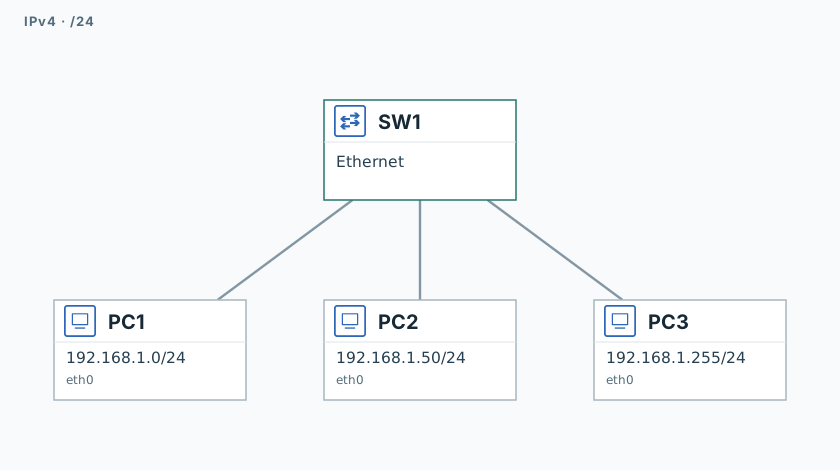
Identify /24 boundaries and correct the PC addresses.
Network
Scroll sideways to exploreOpen full diagram
1. Inspect broadcast
In a /24, .0 is the network address, .255 is broadcast, and host addresses are .1–.254.
PC1
timeout 120 tcpdump -U --immediate-mode -i eth0 -w /tmp/lab-subnet.pcap "arp or icmp" &
capture_pid=$!
sleep 1PC1
ping -n -c 1 -W 1 -b 192.168.1.255
ping -n -c 3 -W 1 192.168.1.50PC1
sleep 2
kill -INT "$capture_pid"
wait "$capture_pid" || true
tcpdump -nn -e -r /tmp/lab-subnet.pcapCompare the broadcast frame to ff:ff:ff:ff:ff:ff with unicast traffic to .50.
2. Correct the addresses
PC1
ip address del 192.168.1.0/24 dev eth0
ip address add 192.168.1.1/24 dev eth0PC3
ip address del 192.168.1.255/24 dev eth0
ip address add 192.168.1.254/24 dev eth03. Test connectivity
PC1
ping -n -c 3 -W 1 192.168.1.50
ping -n -c 3 -W 1 192.168.1.254PC3
ping -n -c 3 -W 1 192.168.1.1All three pings should succeed.
Validation
Click "Check". Once all steps pass, click "End".