Static IP Addressing in a Single Subnet

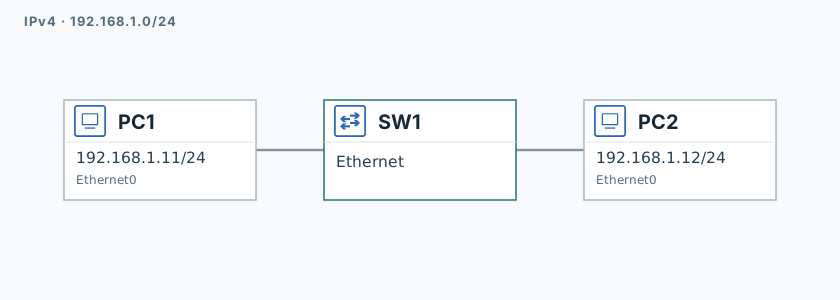
Two hosts on a shared 192.168.1.0/24 network. The student's task is to manually assign static addresses to PC1 and PC2 with no gateway, then verify connectivity with ping within the subnet.

The goal

Two computers on the same local network need to see each other. No router is needed: both hosts sit on the same 192.168.1.0/24 subnet, so they communicate directly over L2. You'll manually assign static addresses and verify connectivity with ping.

IP plan

DeviceIPMaskGateway
PC1192.168.1.11/24
PC2192.168.1.12/24

How to open a node's console — in the guide.

Tasks

  1. On the PC1 console: ip 192.168.1.11/24, then save. On the PC2 console: ip 192.168.1.12/24, then save.
  2. From PC1: ping 192.168.1.12.

Completion criteria

  • PC1 — address 192.168.1.11/24, gateway empty.
  • PC2 — address 192.168.1.12/24, gateway empty.
  • Ping PC1 → 192.168.1.12 succeeds.

Validation

Launch the lab and click "Check" on the session page. When every step turns green — click "End" to free up the stand.